
Ticket Mapping on Registration v2 #
If you’re using Registration v2, ticket mapping has been upgraded for a more streamlined setup experience.
Ticket mappings allow admins to automate registrant assignments directly within the CMS. Once configured, registrants who select a specific ticket during registration are automatically added to the corresponding people group, session, or people tag.
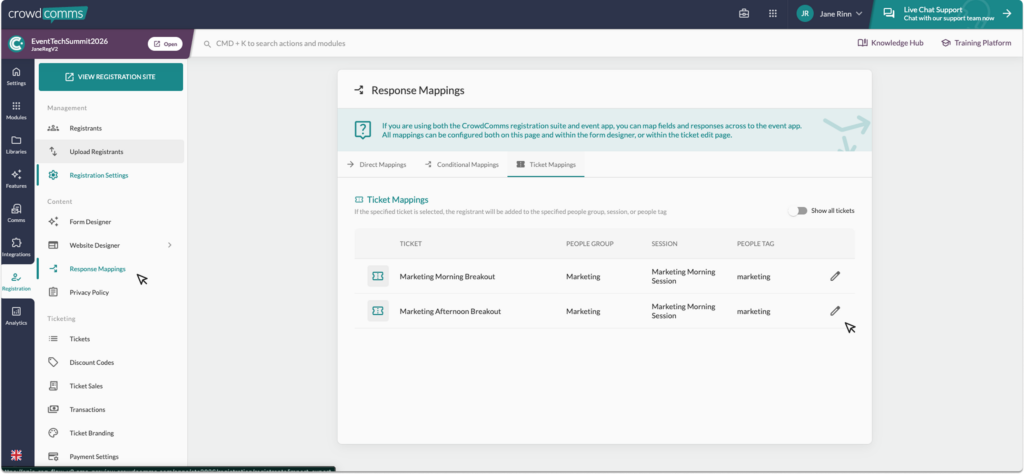
With Registration v2, conditional mappings can now be configured directly when creating a ticket. You can also view and manage all ticket mappings in one centralised location through the Response Mappings tab within Registration.
To learn more about creating a ticket please see here.
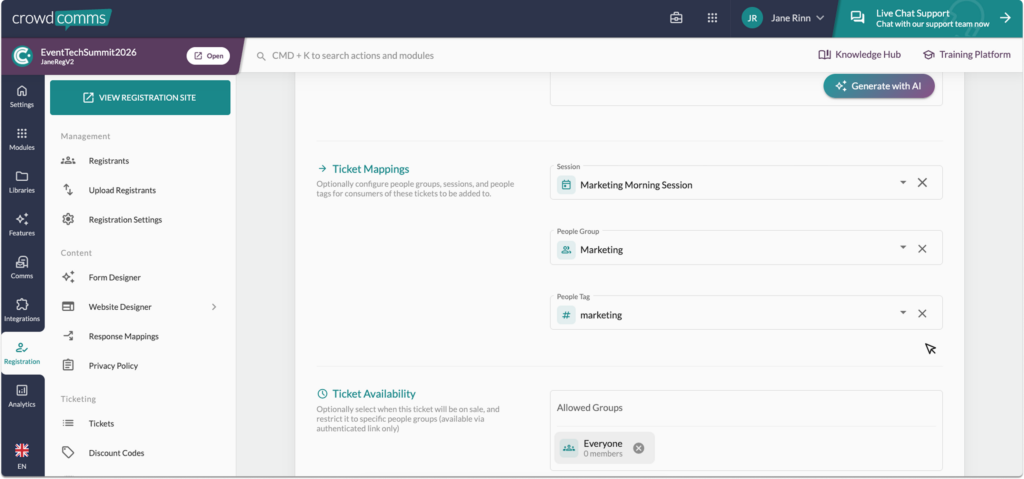
While you are on the ticket creation page, you will see the Ticket Mapping section, as shown below. This section allows you to configure conditional mappings for the specific ticket you are creating by selecting options from the dropdown menu.
Please note:
- This feature is only available on registrations version two, if you are still using version one, all ticket mappings can be customised within the ticket on the form builder, please see here for more information.
- Direct ticket mappings are still managed within the form builder.
- To switch to registration version two please speak to an account manager.


