
Overview #
Pay by Invoice allows event organisers to offer a flexible and professional payment option alongside integrated online payment gateways for event registrations.
When enabled, registrants are presented with both payment methods at checkout and can simply choose the option that best suits their needs.
If Pay by Invoice is selected, an invoice is automatically generated and sent to the registrant’s email upon completion of registration.
Registrants immediately gain access to the event app, ensuring there is no delay to their event experience while payment is processed through internal billing or accounts workflows.
Event administrators retain full control over invoicing settings and branding, with clear visibility of invoice statuses and outstanding balances.
Once payment is received, administrators can manually update the registration payment status to reflect completion.
This feature is designed to support complex event payment requirements while maintaining a smooth, intuitive checkout experience for registrants.
Getting Started #
To begin using the Pay by Invoice feature please speak to an account manager to have it enabled.
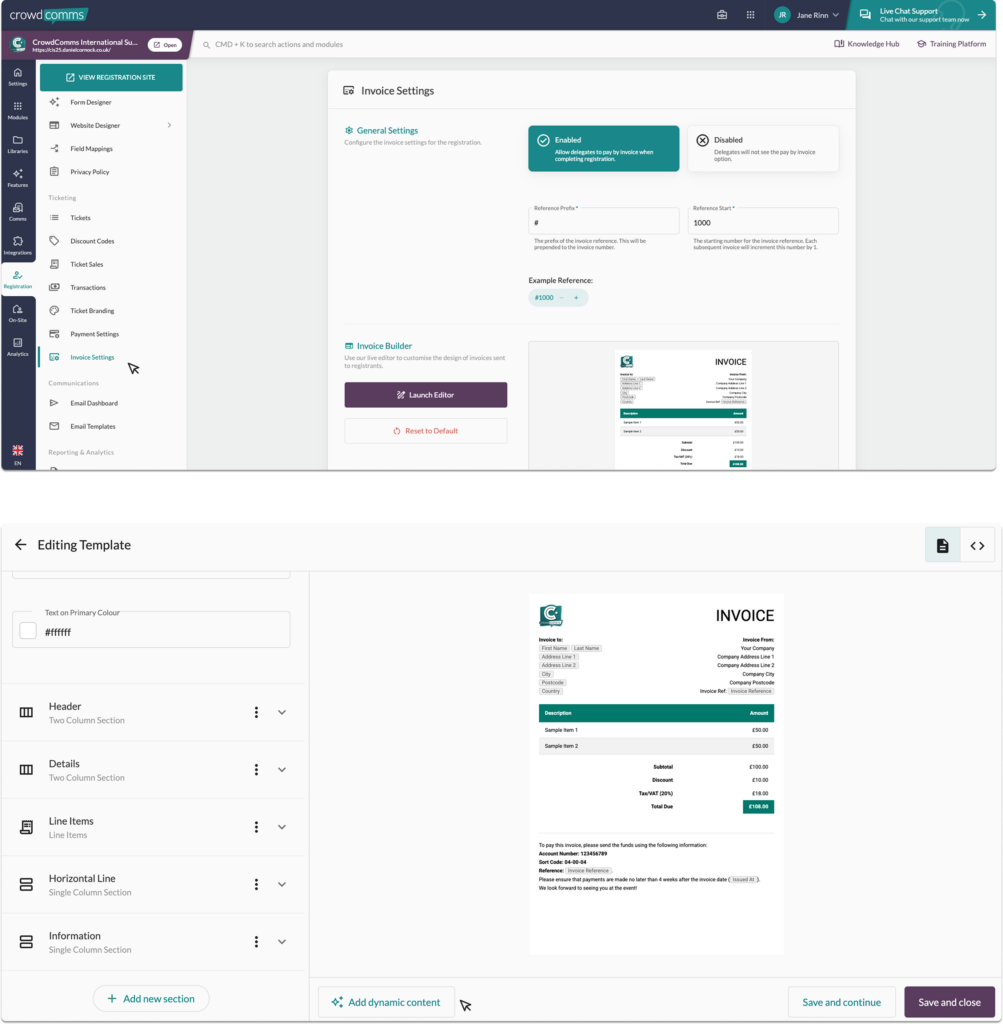
Once enabled, log into the CMS and navigate to the Registration tab on the left side menu, within the secondary menu select Invoice Settings. From here you can:
- Toggle the feature on/off
- Set your reference prefix
- Set the reference start
- Build your invoice
Creating your invoice is effortless with our Invoice Builder. Start with a ready-to-use template and customise every detail from fonts and background images to colours and layout.
Your event app logo is automatically applied, along with a selection of font colours, ensuring a consistent brand look.
Use the Dynamic Content button to easily insert guest-specific information, so each invoice is accurate, personalised, and relevant.
To learn more about transactions please see here.
Please Note #
- Tracking payments and processing refunds must be handled entirely by the event organiser using their own financial systems. This invoicing solution is fully manual and does not include integrated payment or refund management features.
- The starting reference number is only editable before any invoice transactions are created. Once transactions exist, this setting is permanently locked.
- Registrants who opt for “Pay by Invoice” at check out will gain instant access to the event app, if enabled.


