Trade shows, conferences, and exhibitions are some of the most powerful spaces for lead generation, attendee engagement, and business development. But the truth is this: the way many organisations still capture leads at events hasn’t kept up with how people buy, how sales teams work, or how event data is used.
Business cards get lost. Paper forms slow things down. Handwritten notes make it into a CRM… sometimes. And exhibitors often leave events feeling frustrated, unable to prove ROI or follow up properly. Your lead manager or business development team back at the office, can’t effectively follow up!
This is where lead capture software and lead retrieval apps change everything.
They bring together the art of engagement, meaningful conversations on the show floor, with the science of data; accurate, real-time lead information that flows straight to sales teams.
This guide unpacks the questions event organizers and exhibitors are actively searching for, including:
- What is lead retrieval at a trade show?
- How does lead retrieval work?
- How do you follow up on leads from a trade show?
- What is lead capture software?
- How do you capture leads at events?
- What’s the best way to track leads?
What Is Lead Retrieval at a Trade Show?
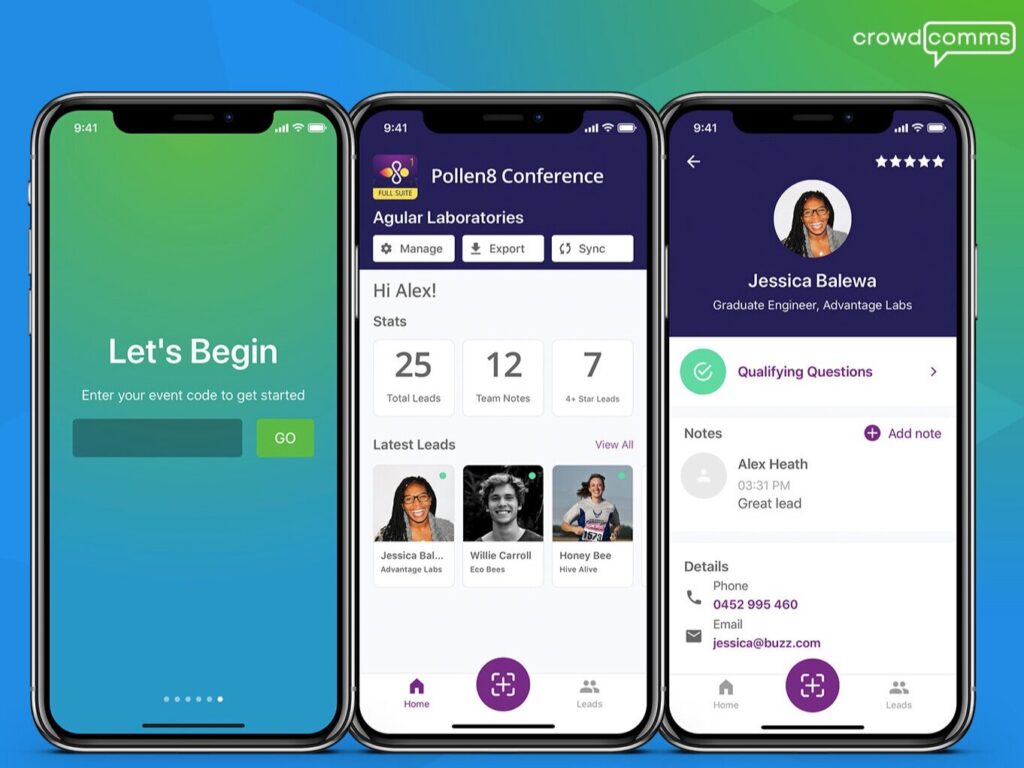
Lead retrieval refers to the process of capturing attendee information, typically using a badge scanner, lead capture app, or mobile badge scanner app, so exhibitors can collect accurate contact details and follow up after the event.
At most modern events, attendees are issued an event badge or QR code that contains:
- Name
- Job title
- Organisation
- Address
- Registration category
- Custom segmentation fields (e.g., interests or sessions selected)
Instead of manually collecting business cards or writing these details down, exhibitors simply scan the badge using a lead capture app. This instantly pulls the attendee information into their device, giving the exhibitor:
- Clean, consistent data
- Real-time access
- A better way to manage leads
- No risk of losing contact information
Event organisers benefit too: all lead data becomes structured and measurable, helping them accurately measureevent engagement, show traffic patterns, and exhibitor performance.
How Does Lead Retrieval Work?
Lead retrieval works by combining an event badge with a lead capture app capable of reading the encoded data.
Here’s the basic process:
- Scan the attendee badge
Using a smartphone or tablet, exhibitors scan the attendee’s QR code or NFC-enabled badge. This eliminates manual data entry and reduces errors.
- Instantly access attendee information
The badge scanner app pulls in contact details, registration information, and any custom fields created by the organiser.
- Add qualification data
Exhibitors can add:
- Lead rating
- Product interest
- Buying timeline
- Notes or voice memos
- Photos of business cards (if needed)
- Tags for CRM workflows
- Sync leads in real time
Leads are shared instantly with the exhibitor’s sales team or exported directly into a CRM like Salesforce, HubSpot, or Dynamics.
- Centralised reporting
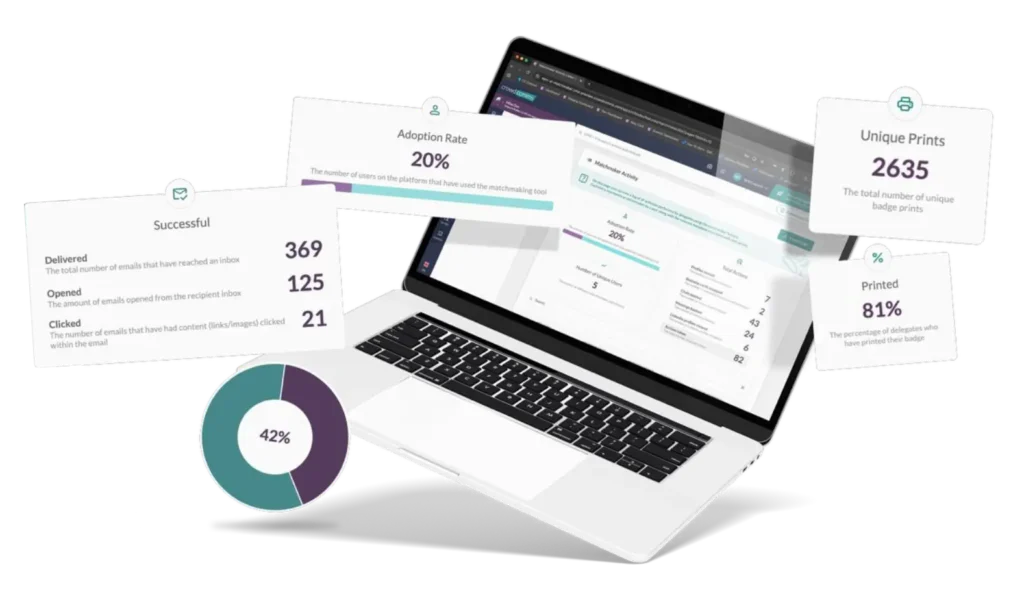
Organisers and exhibitors can both see lead retrieval stats, including:
- Total scans
- Engagement by hour/day/session
- Busiest areas of the show floor
- Exhibitor performance
- Lead quality indicators
This turns badge scanning into meaningful, actionable data that helps both exhibitors and organisers improve future events.
The Art of Engagement: How Exhibitors Capture Leads at Events
Lead capture isn’t just a technical process, it’s a human one. Great events run on conversations, not keyboards.
Modern lead capture apps make the exhibitor experience smoother, faster, and more engaging.
Faster scanning → More time to talk
Instead of typing names or digging for business cards, an exhibitor simply scans the badge on the show floor and gets everything they need in seconds.
Custom questions that guide better interactions
Many lead capture tools allow exhibitors to include customised fields like:
- Product area of interest
- Budget range
- Challenge or pain point
- Urgency level
- Follow-up preference
These fields make it easier to qualify leads on the spot and hold personalised conversations.
Take notes that actually get used
Voice notes, quick text comments, and photos help exhibitors add context that’s useful during follow-up. It also solves the “what did we talk about again?” problem.
Better attendee experience
Attendees don’t want to stand around while someone searches for a pen or enters details manually. A badge scanner app makes every interaction faster and more natural.
Team-wide collaboration
All team members can view and manage leads instantly, helping larger booths stay coordinated.
This is the “art” part of lead capture: removing friction so exhibitors can focus on connection.
The Science of Data: Accurate, Actionable Insights for Organisers
For event organisers, lead capture is more than a tool, it’s a system for improving the whole event ecosystem.
Modern lead retrieval provides organisers with data they’ve never had before, such as:
- Exhibitor performance metrics
- Which exhibitors generated the most leads?
- Which sponsors saw the highest engagement?
- How do these metrics compare year-on-year?
- Show floor insights
Lead heatmaps show:
- High-traffic zones
- Low-engagement areas
- Whether the floorplan layout is working
- Where premium stands should be priced
- Attendee interest trends
Lead data shows what attendees care about:
- Products
- Topics
- Regions
- Solutions
- Industries
This helps organisers design future event content.
- Real-time reporting
Organisers no longer wait until after the event. They can see engagement as it happens, live and in real-time, helping them make better informed conversations when rebooking exhibitors on the show floor.
- Data for sponsorship value
Lead retrieval data becomes proof of:
- Audience engagement
- Demographics reached
- Lead volume
- ROI delivered
This helps organisers sell better packages and increase revenue.
This is the “science” behind lead capture: turning event activity into intelligence.
What Is Lead Capture Software?
Lead capture software is a tool, more often than not, their mobile event app, that enables exhibitors to scan badges,collect leads, and qualify contacts at events.
Essential lead capture features include:
- Badge scanning via QR code or NFC
- Real-time synching with the web app or integrated to your CRM systems
- Custom qualifying questions
- Lead rating/lead scoring
- Offline capabilities for instant access
- CRM integrations
- Team collaboration
- Analytics dashboards
- Exportable CSVs
- Notes and attachments
- User-friendly interface
A good lead capture app saves exhibitors time and ensures organisers get clean, consistent lead data across the event.
What Is the Best Way to Capture Leads at Events?
There are several methods, some effective, some outdated.
❌ Business cards
Easy to lose, hard to track, not structured.
❌ Paper lead forms
Slow, messy, and impossible to integrate with CRMs accurately.
✔️ Badge scanner apps (best practice)
Fast, accurate, and fully integrated.
✔️ Lead capture apps designed for events
The most reliable way to:
- Collect leads
- Qualify prospects
- Generate follow-up workflows
- Measure event data
If an exhibitor wants to accurately track leads, a specialised lead capture app is by far the most effective solution.

How to Follow Up on Leads From a Trade Show
This is where many exhibitors lose momentum.
The key is speed + relevance.
Here’s a simple follow-up framework:
- Sync leads immediately to your CRM
Don’t let the data sit in a spreadsheet.
- Prioritise leads
Use:
- Lead rating
- Qualification fields that align with your CRM
- Tags, perhaps products of note
- Notes – anything that will help close a sale
- Follow up within 48 hours
Personalization matters. Use:
- Context from notes
- Product interest fields
- Timeline information
- Set automated workflows
Sales teams can automate follow-up journeys in their CRM or marketing tool.
- Review the data
What did people ask about most? What messaging worked? What sessions converted?
This is lead capture’s true value: a faster, smarter sales pipeline.
What Is the Best CRM for Lead Generation?
There is no single “best CRM.” It depends on:
- Company size
- Sales cycle
- Integrations
- Workflows
- Budget
But the best CRMs for events share a few traits:
- Seamless integration with lead capture apps
- Easy segmentation
- Automated workflows
- Strong reporting
- Team collaboration
Whether using Salesforce, HubSpot, Pipedrive, Dynamics, or another platform, the important thing is that your lead capture tool syncs clean, structured data in real time.
Why Lead Capture Matters for the Future of Events
Lead data doesn’t just help with follow-up, it informs the entire event cycle.
Event managers use it to:
- Improve the show floor layout
- Adjust pricing
- Create better exhibitor packages
- Build more relevant content
- Forecast demand
- Identify the target audience for next year
- See which audience type engaged most at your event
Lead capture is a powerful tool that helps you create more effective future events.
Why CrowdComms Lead Capture Stands Out
CrowdComms offers a lead capture solution that integrates seamlessly across the entire event experience:
- Fully integrated with registration and event badging
- Fast, reliable badge scanning via QR code
- Real-time lead access
- Custom pricing options
- Team collaboration
- Seamless CRM integration
- Detailed notes, lead rating, and qualification
- Exhibitor-friendly, user-friendly interface
- Organiser dashboards for performance and ROI insight
It’s designed to give exhibitors the tools they need to succeed and organisers the data they need to grow.
Conclusion: Where Art Meets Science at Events
Modern lead capture isn’t simply a tech upgrade, it’s a fundamental shift in how events generate value.
The art lies in the interactions: the conversations, the demos, the moments on the stand.
The science lies in capturing that interest, turning it into structured data, and enabling exhibitors and organisers to measure performance, prove ROI, and create better future events.
When these two sides work together, lead capture becomes more than scanning a badge, it becomes the engine behind your event’s success.