The Corporate Event Series Checklist: Registration, Onsite Flow and Post-Event Follow-Up
The first conference in a series gets all the attention. The second is where the cracks show. The registration form is rebuilt from scratch, the app is a different experience from last year’s, the badge printing was a separate job, the exhibitors’ lead lists arrive in four spreadsheets, and the follow-up starts three weeks late because nobody can find the data. If you run recurring corporate events, whether an enterprise conference series or a calendar of internal corporate events, the aim isn’t to run each event brilliantly in isolation. It’s to build a corporate event programme where registration, onsite flow and post-event follow-up work together, and get a little better every time. This checklist helps you test whether yours does.
1 in 5
organisations have fully integrated their primary event platform with their sales and marketing stack
28%
of the largest organisations have deployed six or more event technology platforms
90%+
of organisations are focused on improving post-event follow-up
IN THIS GUIDE
- What makes recurring corporate events different?
- What is the “connected programme” test?
- Registration you build once and reuse
- A branded event app attendees use
- Onsite check-in kiosks and a smooth arrival
- Lead capture that sponsors and exhibitors use
- Attendee analytics that guide the next event
- Post-event follow-up that starts straight away
- How does the checklist change for internal events and conference series?
- The full programme checklist
What makes recurring corporate events different from one-off events?
Quick answer: when events repeat, every manual workaround repeats too, and every missing connection costs you again.
With a one-off event, a spreadsheet and a lot of goodwill can get you through. A series changes the maths. Anything you build once can be reused. Anything you patch together has to be patched again. And the data from one event becomes the starting point for the next, if you can get at it.
WHAT CHANGES WHEN EVENTS REPEAT
- Set-up: you want to start from a proven build, not a blank page
- Experience: attendees, sponsors and senior stakeholders notice inconsistency from one event to the next
- Data: what happened last time should shape the plan for next time
- Follow-up: speed matters more because the next event is already on the calendar
A series is judged on its second event, not its first.
What is the “connected programme” test for your corporate event programme?
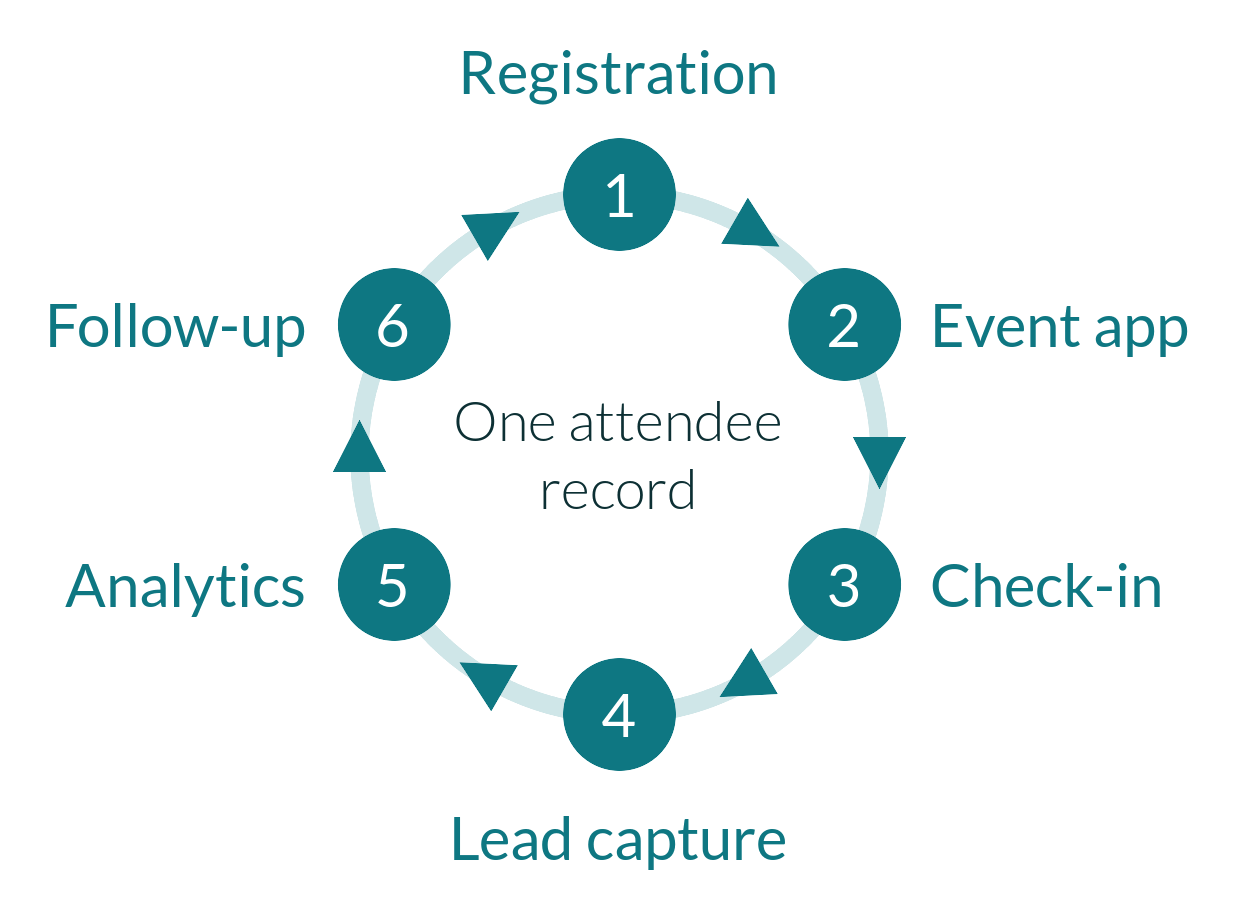
Quick answer: can one attendee record travel from registration through the app, onsite check-in, lead capture and analytics into follow-up without anyone retyping it?
If the answer is “mostly, apart from the exports”, you’ve found where your time goes. The test is simple. Pick one attendee and follow their record through your programme.
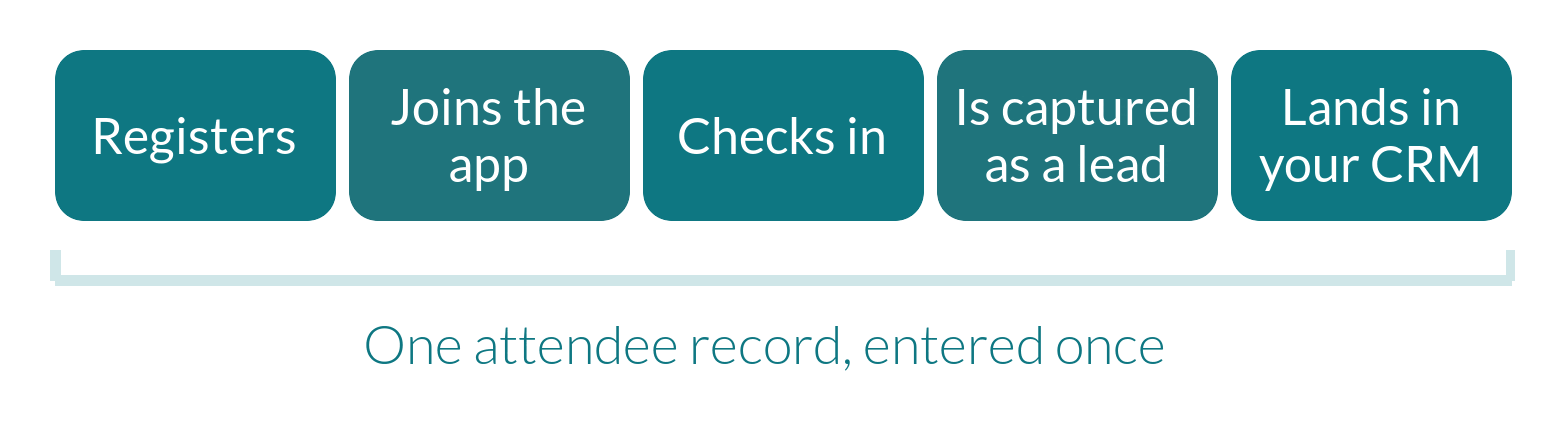
FOLLOW ONE ATTENDEE THROUGH YOUR PROGRAMME
- They register, and their details are captured once
- Their registration details feed their event app profile and agenda
- Their badge is printed from the same record when they arrive
- Their attendance is recorded as they move around the event
- Sponsors and exhibitors capture them as a lead if they choose to engage
- Their data lands in your CRM, ready for the right follow-up
HOW THIS WORKS IN PRACTICE
- CrowdComms is built around this idea. Registration, the branded event app, onsite check-in, attendance tracking, lead capture and analytics sit in one platform, so registration, badging and attendance data come from a single source
Our recommendation: run the test on your last event and list every point where someone exported, copied or re-entered data. That list is your priority order.
How do you set up registration once and reuse it for recurring corporate events?
Quick answer: build a branded registration journey with conditional logic, agree your data fields up front, and reuse the build for every event in the series.
Registration is the foundation of the programme. If it’s consistent and well structured, everything after it is easier.
YOUR ACTION CHECKLIST: REGISTRATION
- Build one branded registration journey with conditional logic for each attendee type, rather than a form per group
- Agree your data fields with the teams who will use them, including your CRM owners
- Put your own domain and sending email address on registration pages and emails
- Automate the email sequence from invitation to thank-you
- Decide how payments, discount codes and invoices will work, and who signs it off
- Keep a “master” version of the build to start from for the next event
HOW THIS WORKS IN PRACTICE
- CrowdComms offers a drag-and-drop form designer (or custom code) with unlimited conditional logic, a landing page designer, and white-label options including a custom domain and sending email address
- Email templates, status-based sends and scheduled reminders, plus PDF tickets and receipts, can run automatically
- A choice of integrated payment gateways (including Stripe and Square), discount codes and invoice or purchase-order billing cover the money side
- Registration journeys can be designed once and reused across events as templates
Our recommendation: treat your first event’s registration build as the template for the series, and write down what you’d change before you start the next one. Our complete guide to conference registration workflows walks through each stage.
Why does a branded event app matter for recurring corporate events?
Quick answer: because the app is where attendees spend the event, and a consistent, branded experience builds familiarity from one event in the series to the next.
An event app that looks like your brand, and works the same way each time, teaches attendees what to expect. That’s valuable when the audience returns year after year.
YOUR ACTION CHECKLIST: EVENT APP
- Brand the app so it feels like part of your company, not a third-party product
- Pre-build each attendee’s agenda from their registration
- Give attendees one simple way to get in: download, browser or both
- Choose two or three features that match your goals, such as networking, live polls and Q&A, and a resource library
- Send notifications to the groups they matter to, rather than to everyone
- Reuse the structure from the previous event and improve it, rather than starting again
HOW THIS WORKS IN PRACTICE
- CrowdComms event apps are fully branded with your colours, logos, fonts and layouts, and can be used as a native app, a PWA or in a web browser
- They include personalised agendas, networking with AI-powered matchmaking, live polls, Q&A, custom challenges and event games, a resource library, and push notifications to everyone or to selected groups
- Real-time session and speaker updates keep attendees informed when plans change
Our recommendation: pick the three jobs your attendees most need the app to do, and make them excellent. Our guide on how to optimise your event app for attendees goes deeper.

How do onsite check-in kiosks keep arrival moving?
Quick answer: use the registration data you already hold to print badges and scan QR codes, offer self-service kiosks alongside a staffed desk, and rehearse arrival day.
For a corporate conference, arrival is the one moment a lot of people need the same thing at the same time. It’s also where a disconnected set-up shows up in a queue.
YOUR ACTION CHECKLIST: ONSITE FLOW
- Check in from the same registration record, so nobody retypes anything
- Put a QR code on every confirmation, and test scanning
- Offer self-service check-in kiosks alongside a staffed desk for queries and walk-ups
- Print badges with the right name, role and colour coding
- Track attendance, so you know who came and where
- Rehearse the full journey, from scan to badge, and plan for what happens if something fails
- Have experienced people onsite who can fix things in real time
HOW THIS WORKS IN PRACTICE
- CrowdComms provides badges and QR codes generated from registration data, badge printing and scanning, self-service kiosks, attendance tracking and onsite support teams
- At DEMEC 2025, CrowdComms ran onsite registration and badging for more than 1,000 delegates arriving within a 30-minute window, integrated with the client’s existing registration platform. Registration itself ran on that platform. Read the DEMEC 2025 case study
Our recommendation: ask for your onsite plan at the same time as your registration plan. Our guide to onsite event registration covers set-up in more detail.

How do you make lead capture work for sponsors and exhibitors?
Quick answer: make capturing a lead as simple as scanning a badge, and make sure the data reaches the people who need it.
In a conference series, sponsors and exhibitors decide whether to come back based on what they got out of the last one. Event lead capture is how they measure it.
YOUR ACTION CHECKLIST: LEAD CAPTURE
- Give exhibitors a simple tool that works on the devices they already carry
- Brief exhibitors before the event, so first-time users feel confident
- Make sure attendee consent and privacy wording is clear
- Agree what data exhibitors receive, and how quickly
- Report sponsor and exhibitor activity back to them afterwards
- Use their feedback to improve the offer for the next event
HOW THIS WORKS IN PRACTICE
- CrowdComms offers exhibitor lead capture through QR code scanning, and reporting on sponsor interactions
- In the DEMEC 2025 case study, lead capture adoption was 100%, including among non-traditional exhibitors unfamiliar with lead capture
Our recommendation: treat exhibitors as customers of the event. Easy lead capture and clear reporting is what brings them back.
What attendee analytics should you look at for recurring events?
Quick answer: track registration, attendance and engagement together, and watch the numbers while you can still act on them.
Analytics for recurring events do two jobs: they help you improve the current event while it’s running, and they give you a baseline for the next one.
YOUR ACTION CHECKLIST: ATTENDEE ANALYTICS
- Track registrations in real time, so you can act while there’s still time to boost them
- Segment attendees by type, so each team gets the view it needs
- Measure attendance, not just registration
- Track app adoption, page and module views, networking and poll participation
- Capture exhibitor and sponsor interactions
- Record the results in one place, so next year’s plan starts from real numbers
- Compare each event against the last in the series
HOW THIS WORKS IN PRACTICE
- CrowdComms offers real-time registration analytics, segmentation and export-ready reporting
- Reporting dashboards and app analytics cover app usage, adoption, page and module views, networking and profile views, and live poll results, and exhibitors can see how attendees interacted with their profile and documents
- Attendance tracking records who came, giving you event data that feeds the planning for your next event
Our recommendation: agree three or four numbers that matter before the series starts, and report them the same way every time.

How do you start post-event follow-up straight away?
Quick answer: connect the attendee data to your CRM and marketing automation before the event, so follow-up begins the day it ends.
In Forrester’s 2025 survey of more than 250 event decision-makers, over 90% of organisations were focused on improving post-event follow-up, yet only one in five had fully integrated their primary event platform into their broader sales and marketing tech stack. That gap is the opportunity. Follow-up is faster and more accurate when it starts from the same record that registration created.
YOUR ACTION CHECKLIST: FOLLOW-UP
- Connect registration and attendance data to your CRM before the event, not after
- Agree who follows up with whom, and when
- Segment by what attendees actually did, such as sessions attended and sponsors visited
- Send a thank-you promptly, with resources and recordings
- Share results with sponsors, exhibitors and senior stakeholders
- Add what you learned to your checklist for the next event
HOW THIS WORKS IN PRACTICE
- CrowdComms offers native integrations with Salesforce, HubSpot, Microsoft Dynamics and Marketo, a publicly available API and Zapier
- Registration, attendance and engagement data sit in one platform, so teams can segment and export what they need for follow-up
Our recommendation: map your CRM fields at the start of the series, and keep them the same from event to event so reports can be compared.
How does the checklist change for internal events and conference series?
Quick answer: the principles are the same. What changes is the audience, the stakes and which parts you lean on most.
This is a general guide. Your events will have their own mix.
| What to look at | Enterprise conference series | Internal corporate events |
|---|---|---|
| Typical audience | Customers, partners, prospects and employees | Employees, leaders and teams |
| What matters most | Brand consistency, lead capture, CRM follow-up | Access control, communication, attendance records |
| Registration focus | Branded pages, payments, attendee types | Controlled access, simple journeys, reminders |
| App focus | Networking, sponsors, engagement | Agenda, updates, announcements and feedback |
| Analytics focus | Leads, pipeline influence, return rate | Attendance, engagement, feedback |
| Follow-up focus | Sales and marketing follow-up | Communications and feedback loops |
Our recommendation: start with the row that matters most to your programme, and make sure everything below it connects.
The recurring corporate events programme checklist
BEFORE YOUR NEXT EVENT IN THE SERIES, CHECK:
- You’ve traced one attendee through your programme and listed every export and re-entry
- Registration is built once with your branding and conditional logic, ready to reuse
- Your data fields are agreed with the teams that use them, including your CRM owners
- The event app is branded, and each attendee’s first screen shows their own agenda
- Check-in uses the registration record, with QR codes, badges and self-service kiosks
- Onsite support is booked and arrival day has been rehearsed
- Exhibitors and sponsors have an easy lead capture tool and know how to use it
- Analytics cover registration, attendance and engagement, with the same measures every event
- Your CRM connection is tested before the event, not after
- You’ve written down what to change for next time
One Platform. Every Event In The Series.
Speak to the CrowdComms team today to see how our branded event app, onsite check-in, attendee analytics and lead capture work together across your recurring corporate events.

Built For Every Type Of Event.
Designed For Every Kind Of Event Planner.