The Complete Guide to Conference Registration Workflows
Picture the last conference you attended. Chances are the registration workflow barely registered with you, which is exactly the point. A good conference registration workflow is a chain of small moments that all go quietly right: an invitation lands, you choose a ticket, a confirmation arrives, a change is easy to make, a badge is waiting, and the follow-up comes from someone who knows who you are. When one link is missing, somebody on the events team fixes it by hand. This guide walks through the whole workflow, stage by stage, with practical tips for choosing conference registration software that supports each one.
55%
of people who visit an online form don't complete it
11.3 vs 8
the average checkout form has 11.3 fields, when only 8 are needed
31%
more satisfied with event performance when event tech is fully integrated with martech
IN THIS GUIDE
- What is a conference registration workflow?
- Stage 1: Plan
- Stage 2: Build
- Stage 3: Confirm
- Stage 4: Collect
- Stage 5: Adjust
- Stage 6: Check in
- Stage 7: Sync
- Conference registration workflow checklist
What is a conference registration workflow?
A conference registration workflow is the full path a person takes from first hearing about your event to being recorded, welcomed and followed up with afterwards. It covers the registration form, but it also covers ticket choices, confirmations and reminders, payment, the changes people make along the way, onsite check-in, and the attendee data that flows into your other systems.
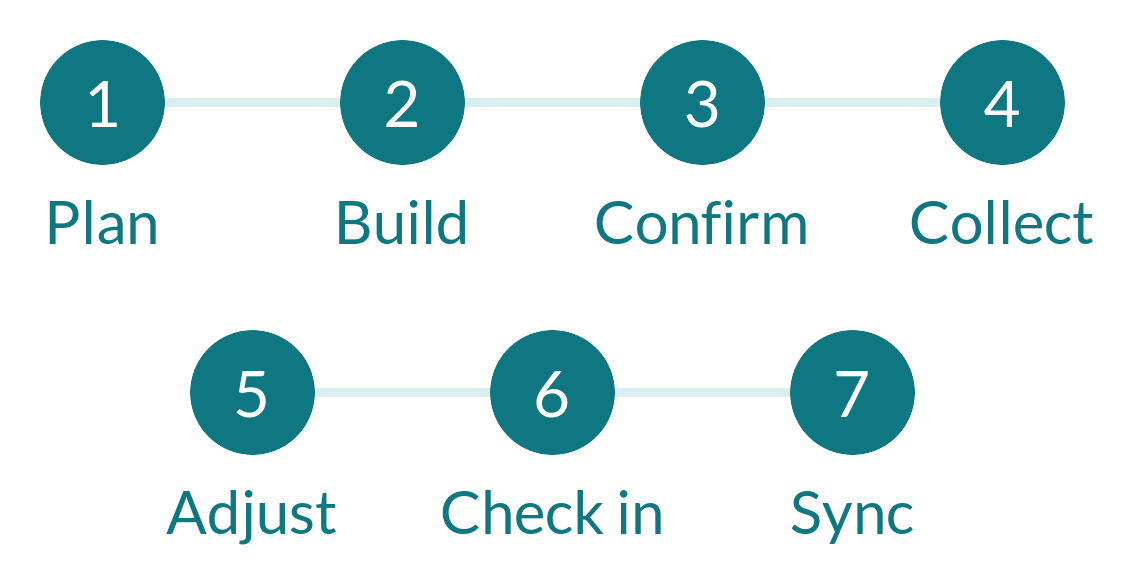
It helps to think of it as seven stages, each with a different job to do:
| Stage | The job it does | What good looks like |
|---|---|---|
| 1. Plan | Define attendee types, tickets, capacity and consent | Decisions made before the form is built |
| 2. Build | Create the form, pathways and landing page | Short, branded, mobile-friendly, logic-driven |
| 3. Confirm | Invite, confirm and remind | Automated, branded, and sent at the right moment |
| 4. Collect | Handle tickets, payments, codes and groups | Clear limits, flexible payment, simple group booking |
| 5. Adjust | Manage changes, add-ons and declines | Registrants update their own details |
| 6. Check in | Welcome people and issue badges | Scan, print, go |
| 7. Sync | Move data to your CRM and reports | Automatic, accurate and secure |
How do you plan a conference registration workflow before you build it?
Quick answer: decide who is attending, what each group needs to be asked, which tickets you will offer, and what happens to the data afterwards. These decisions shape everything the form has to do.
The most effective registration workflows are planned on paper first. A short planning session saves hours of rebuilding later, because every decision about tickets, questions and consent shapes what the form has to do. If you run registration across several business units, our guide to standardising registration for enterprise events covers how to make those decisions once instead of event by event.
QUESTIONS TO ANSWER BEFORE YOU BUILD
- Who is attending, and do different groups (delegates, speakers, sponsors, VIPs, members) need different journeys?
- What does each group need to be asked, and what can you leave out?
- Which tickets will you offer, how many of each, and for what dates?
- Who needs to review anything before it goes live, such as pricing, discounts and data-collection wording?
- What happens to the data afterwards, and who needs it?
That last question matters more than it seems. If sales will follow up with attendees, the CRM fields need to exist before the first registration arrives, not after the event.
A good workflow is mostly decided before anyone opens the form builder.
Look for a platform that lets you set the foundations in one place. In CrowdComms, for example, the registration settings cover the event name, introductory text, capacity limits and branding, along with whether registration is public or private and whether email verification is required. Privacy policy wording, with customisable default language, is part of the build too, so consent isn’t an afterthought.
Our recommendation: write your attendee types and data needs down before you log in, and let the answers drive the set-up.
How do you build a conference registration form attendees actually finish?
Quick answer: keep the form short, ask only what you will use, and use conditional logic so each attendee type sees only the questions that apply to them.
Short forms tend to be finished. Every extra question is another small decision for the registrant, so the goal is to ask only what you will genuinely use. Where you do need more detail, conditional logic lets you ask it only of the people it applies to: a speaker sees speaker questions, a sponsor sees booth questions, and a general delegate sees neither. Our guide to what features event registration software should include and our event registration best practices for 2025 go further on form design.
FORM BUILDING ESSENTIALS
- A clear, branded registration site that works well on a phone
- Conditional logic, so each attendee type sees a tailored path through a single form
- Custom fields for the details you genuinely need, such as dietary requirements or session choices
- Consistent field names, so the data lines up cleanly with your other systems
With CrowdComms, teams build registration forms with a drag-and-drop designer, conditional logic and validation, so each attendee type sees the right questions and the data arrives clean, or custom code can be applied where you need more control. A separate landing page designer gives you responsive, branded layouts, and registrant answers can be mapped through to other CrowdComms products.
Our recommendation: start with the shortest form that works, then add questions only where a real decision depends on the answer.

How should registration confirmations and reminders work?
Quick answer: send an immediate confirmation with the ticket or receipt, follow with scheduled reminders, and automate everything you can so your team isn’t pressing send by hand.
The moment someone registers, they want reassurance that it worked. A prompt confirmation with their ticket or receipt does exactly that, and it also cuts down on the “did my registration go through?” emails your team would otherwise answer one by one.
After that, the aim is to keep people informed without anyone manually hitting send. This is registration workflow automation at its simplest: the right message reaching the right person at the right moment.
EMAILS WORTH AUTOMATING
- An invitation that makes registering a single click
- An immediate confirmation, with the ticket or receipt attached
- A scheduled reminder as the event approaches, with practical joining or travel information
- A follow-up that depends on status, for example one for confirmed attendees and a different one for those still pending
- A thank-you message after the event
CrowdComms provides branded templates for invitation, reminder, verification and confirmation emails, can trigger sends based on registrant status and behaviour, and delivers tickets and receipts as PDFs automatically. The platform’s Registration Email Dashboard shows what has gone out and how people have responded.
Our recommendation: write and schedule your whole email sequence before registration opens, not as the event approaches.
How do you handle tickets, payments and group bookings?
Quick answer: set ticket types, capacities and availability dates up front, choose how people pay, and give group bookers a pathway that lets them assign names later.
This is the stage where small design choices avoid big headaches. Decide your ticket types and limits up front, set the dates they’re available, and think about how people will pay.
TICKETING AND PAYMENT DECISIONS
- Ticket types and capacity: free, paid, early bird, VIP or member tickets, each with their own limits and availability windows
- Discount and promo codes: fixed amounts or percentages, with start and end dates, minimum spend and usage limits
- Payment method: an integrated payment provider so funds are collected at the point of booking, with an invoicing route where your audience needs one
- Group bookings: a pathway that lets one person book several places and assign the names afterwards, instead of chasing every delegate for details on day one
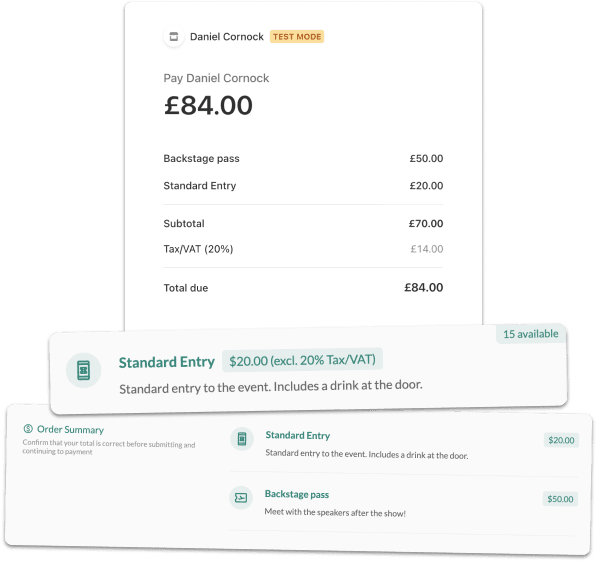
These are all things CrowdComms handles in one workflow: single or multiple ticket selection with set capacities and dates, early bird, VIP and member tickets, tickets for session and activity sign-up, discount codes with their own limits, payment through a choice of integrated gateways (including Stripe and Square), invoice or purchase-order billing, and group registration with names assigned after booking.
Our recommendation: open with a clearly time-limited early bird ticket and cap capacity per ticket type, so the numbers tell you how the event is tracking.
What happens when attendees change their plans?
Quick answer: let registrants update their own details and add tickets through a secure link, so most changes never reach your team’s inbox.
They will, and the workflow should expect it. A colleague swaps in, a dietary requirement changes, someone wants an extra ticket. If the only route is an email to your team, each change becomes a task. If registrants can update their own details, most of those tasks disappear.
Small changes handled by the registrant are small changes your team never has to touch.
CrowdComms supports this through attendee self-service editing: registrants verify their email, receive a secure link, then update personal details or add tickets where available. It’s worth knowing that administrators switch this on, as it is off by default, so add it to your launch checklist. Behind the scenes, every response carries a status (invited, draft, pending verification, registered, declined or cancelled), and the list can be searched and filtered by status, payment, group and response, with exports that respect your filters.
Our recommendation: review your pending list a week out and send a nudge to everyone who started but hasn’t finished.
How do you make onsite check-in feel effortless?
Quick answer: capture the right data at registration, send every attendee a QR code, and print badges on the spot, with kiosks for walk-ups and a team on hand for queries.
For many attendees, check-in is the first real impression of your event. The aim is a short, calm queue: people arrive, scan, collect a badge and go.
The workflow decisions that make this possible are made weeks earlier, in the form and ticket set-up. If the right information was captured at registration, the badge can be printed with the correct name, role and access without anyone typing a thing.
ONSITE CHECK-IN ESSENTIALS
- A QR code on every confirmation, so attendees can scan on arrival
- Badge printing, with layouts that show names, roles and sponsor logos
- Self-service kiosks alongside a staffed desk for queries
- Colour-coded badges so staff can recognise delegates, speakers and sponsors at a glance
CrowdComms builds check-in into the same platform: badges and QR codes come from your registration data, with dual-sided layouts, sponsor logos and colour-coded roles, and customisable kiosk displays in desktop and freestanding formats. Onsite support teams can work as an extension of your crew, from 50-person meetings to conferences of 5,000+ delegates. Our guide to onsite event registration goes deeper on setting this up.
Our recommendation: test the whole journey, from QR scan to printed badge, before the doors open, and keep a staffed desk for the exceptions.

How does registration data reach your CRM and reports?
Quick answer: connect your registration platform to your CRM so attendee data flows through automatically, and use real-time reporting to see how the event is performing.
The workflow doesn’t end when the event does. The registration, check-in and engagement data you’ve collected is what lets marketing and sales follow up with the right people, and what lets leadership see how the event performed.
The less that data relies on manual exports, the more accurate and timely it is. That’s why integrations matter: when registration data flows into the systems your teams already use, the follow-up starts from a single record rather than a spreadsheet. Our guide to connecting your event data to your CRM covers what should flow across and why most teams get it wrong.
WHAT TO LOOK FOR IN REPORTING AND INTEGRATION
- Native integrations with your CRM and marketing automation platform, plus an open API for anything bespoke
- Real-time registration analytics, so you can see how sign-ups are tracking while there’s still time to act
- Export-ready reports and data segmentation, so each team can pull the view it needs
- Security standards your IT and legal teams can sign off on
CrowdComms integrates natively with Salesforce, HubSpot, Microsoft Dynamics and Marketo, and offers a public API and Zapier for anything else. Salesforce data syncs on a schedule, every 30 minutes, so plan follow-up timing accordingly. Real-time analytics, segmentation and export-ready reporting give each team the view it needs, and the platform is SOC 2 compliant and ISO 27001 certified (BSI), which helps when IT and legal need to sign off. If you are still comparing platforms, our 30 questions to help you choose the best event registration platform is a useful shortlist.
Our recommendation: agree your CRM field names during planning, so the data lands in the right place the first time.

Conference registration workflow checklist
BEFORE YOU LAUNCH, CHECK:
- Every attendee type (delegate, speaker, sponsor, VIP) has a defined journey
- The form asks only for information you will actually use
- Conditional logic shows each person only the questions that apply to them
- Ticket types, capacities, availability dates and discount codes are set and tested
- Group bookings have a pathway that lets names be assigned later
- Confirmation and reminder emails are written, branded and scheduled
- You’ve decided whether attendees can edit their own registration, and switched it on if so
- Check-in is tested end to end: QR scan, badge print and on-the-day registration at the kiosk
- Registration data flows into your CRM automatically, with field names agreed in advance
- Your reporting is set up so you can see sign-ups as they happen
Registration Made Smooth. From First Invitation To Final Follow-Up.
Speak to the CrowdComms team today to see how our event registration software can take your conference from first invitation to final follow-up.

Built For Every Type Of Event.
Designed For Every Kind Of Event Planner.